 By Siam
Want to create professional videos 10X faster — without a film crew or production costs? Artificial intelligence can help. Marketing teams today face relentless demand for fresh social media content across platforms. From daily Instagram posts and TikToks to LinkedIn and YouTube videos, brands are expected to produce content at an unprecedented scale. That’s where Vidnoz AI comes in. It gives marketers the power to generate studio-quality videos in minutes, using AI technology. In this guide, we’ll learn everything about Vidnoz AI and how it helps marketers produce 10X more videos.
Part 1: Vidnoz AI: Produce 10X Videos
Vidnoz AI is a web-based AI video creation tool that allows marketers, content creators, and L&D teams to produce high-quality videos at unprecedented speed. With its library of realistic AI avatars, customizable templates, and AI voices, Vidnoz eliminates the need for a camera, actors, studio, or complex software. Whether you’re building product demos, training modules, personalized marketing videos, or social media content, Vidnoz AI streamlines the entire production workflow. Plus, the program never compromises on security with its ISO/IEC 27001:2022 certifications; all your sensitive data is safe and secure. The program also offers an intuitive and user-friendly interface, which is best for non-tech and beginner users.
Part 2: Key Features That Make Vidnoz AI a Top Choice
Vidnoz AI offers amazing features, making it the best option for marketers to produce 10X more videos effortlessly. Here are the top features of this programÖ
- Customizable Video Templates
Vidnoz AI offers 2800+ video templates, allowing users to create various types of videos at 10X speed. With the help of these pre-designed templates, users can create multiple types of videos, such as how-to guides, product demos, tutorials, and more. Plus, users can also create custom templates from scratch that match your brand identity.
- Lifelike AI Avatars
The program features over 1,700 AI avatars from various industries and roles. It includes avatars of doctors, students, hosts, chiefs, teachers, and more. Additionally, users can create their digital using Avatar Lite and Avatar Pro offer deeper customization options.
- Natural-Sounding Voices
It provides 1830+ AI voices, all powered by ElevenLabs, Google, and Microsoft. The program includes the voices of celebrities, cartoon characters, anime, politicians, and more. Additionally, content creators can select from a diverse range of voice styles, sentiments, and emotions to perfectly match their video’s intended tone and style.
- AI Video Wizard
With the help of this program, users can create high-quality videos with a simple text prompt or any source material. The program requires no editing experience or professional help to produce high-quality videos at 10X speed.
- Free Version
The standout feature of this program is that it also includes a free version, allowing users to produce a 2-minute video daily at no cost. Free version of Vidnoz AI offers amazing features, such as AI Video Editor, Online Video Enhancer, Avatar Lite, Avatar Pro, Voice Cloning, and more.
READ ALSO: Can AI Video Generation Adapt to Different Cultural Storytelling Styles?
Part 3: Strengths and Limitations of Using Vidnoz AI
Just like any other AI tool, Vidnoz AI also offers benefits and limitations. To make you understand better, below we have mentioned the top pros and cons of using Vidnoz AI:
Pros
- Offers an intuitive and easy-to-use interface, enabling anyone, from marketers and content creators to professionals, to create high-quality videos at 10X speed.
- Web-based tool, meaning no software downloading or installation is required to use the program. Accessible from any web browser.
- Include a great variety of aspect ratio templates, including landscape (1920 x 1080) and portrait (1080 x 1920) to match various display requirements.
- Provides a wide range of AI tools, such as AI Talking Avatar, AI Cartoon Generator, AI Voice Changer, AI Text to Video, Online Video Editor, AI Video Enhancer, and more.
- With Vidnoz AI Video Editor, users can customize AI videos according to their requirements. It allows users to cut and trim footage, add animated effects, and change the background.
Cons
- To create high-quality videos with Vidnoz AI, users must have a stable and active internet connection.
Part 4: Step-by-Step Guide for Producing 10X Video With Vidnoz AI
Vidnoz AI offers an intuitive interface, making the video creation process simple. Here is how to produce 10X videos with Vidnoz AI:
- Navigate to Vidnoz AI’s official site and sign in with your free account. Choose the template and avatar for your video.
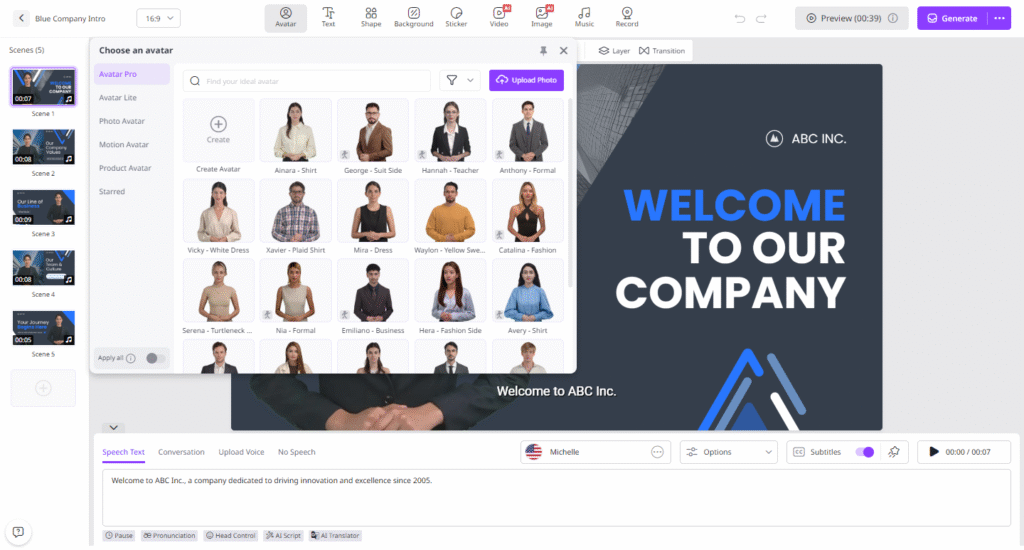
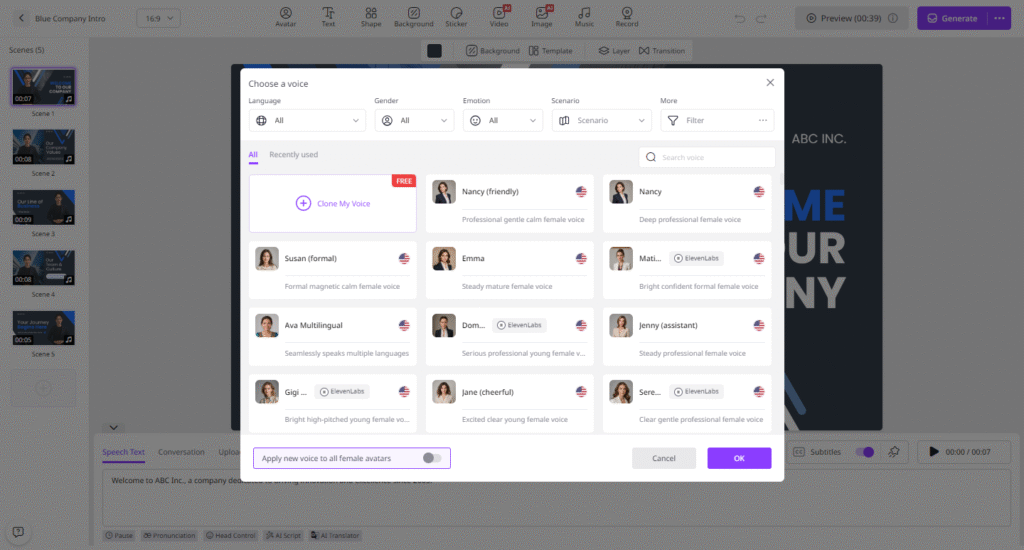
- Input the text or upload any source material. Select the AI voice and language of the voice.
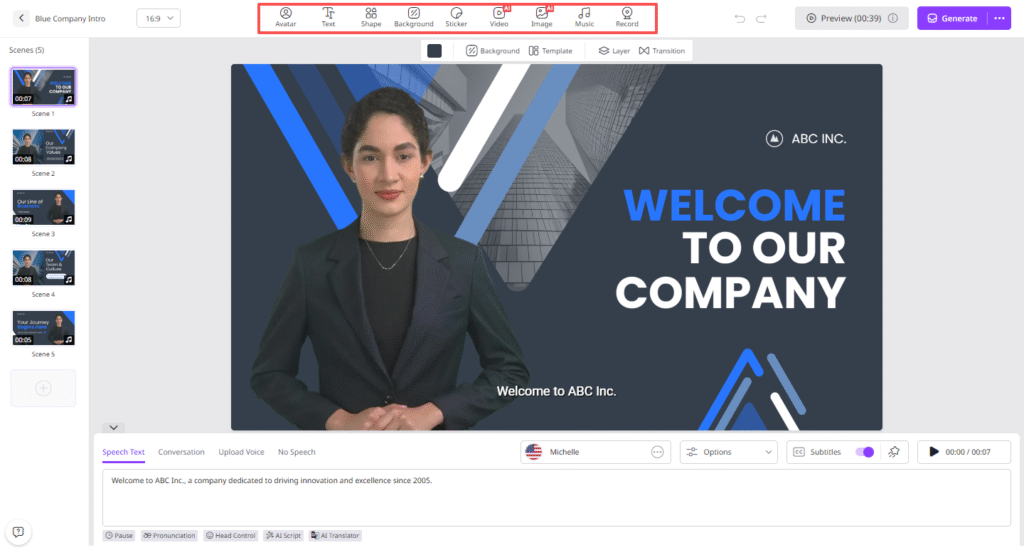
- Next, use the Online Video Editor to customize the video according to your needs. It allows users to change the background, add music, and more.
- Click on the “Generate” button to begin the video creation process. Within seconds, your video will be ready. Select “Download” to export it in MP4 format.
Final Thoughts
Vidnoz AI allows marketers and creators to produce high-quality content 10X faster. With AI-powered avatars, realistic voices, and pre-designed templates, it eliminated traditional production hurdles.
YOU MAY ALSO LIKE: Best AI Talking Photo Tools of 2025: Bring Your Images to Life