
 By Prime Star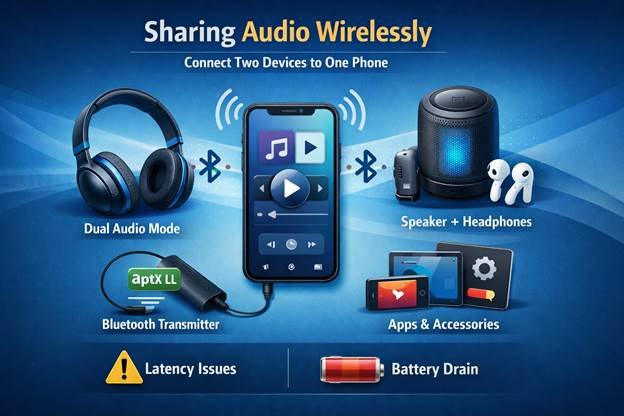
Sharing music or a movie with a friend without sharing an earbud is one of those little luxuries of modern life. Whether it is linking two Bluetooth headphones to a single phone or connecting a Bluetooth headphone and speaker for a movie night on the go, this guide from a writer who has spent more than 10 years testing audio gear covers workable ways to pair devices, and the real-world trade-offs you will need to consider.
Why wireless sharing of audio is important and what to expect
Phones, tablets and laptops used to only allow a single audio output at a time. Current devices and accessories often allow listening on two outputs simultaneously, but they are not all created equal. It is easiest when native phone features work, but Bluetooth transmitters offer greater device compatibility.
Warning: there will be a small latency on certain functions which might affect video lip sync. Two headsets being active may also affect battery life and audio quality.
Three workable solutions to connecting two Bluetooth headphones to one cellphone
1. Native dual-audio on modern phones
Many modern smartphones include built-in features like “dual audio” or “audio sharing” that allow broadcasting to two Bluetooth devices simultaneously. This is arguably the most appealing option since it requires no special hardware, usually needs minimal setup and often provides good synchronization when both headphones come from the same system.
In my experience, two matching headsets paired via a phone’s native sharing feature provide the cleanest listening experience and the longest runtime.
2. Use a Bluetooth transmitter or splitter
If your phone does not have sharing capabilities, two headsets can listen through a small Bluetooth transmitter inserted into the phone’s headphone jack or USB-C port via a short cable. Many of these transmitters support aptX Low Latency codecs for improved sync, and they can be a lifesaver for older phones or laptops. The tradeoffs are that you have to carry extra hardware and monitor another battery, but the versatility is enormous. You can plug in almost any pair of headphones or even one headphone and one Bluetooth speaker.
3. App-based and accessory solutions
Some headphone manufacturers provide companion apps that handle multi-device pairing or offer proprietary party modes. Some smart TVs and tablets include built-in multi Bluetooth audio output as well. These solutions are useful if you have the specific devices they support, but they are often fragmented across brands and platforms.
How the options compare: convenience, quality and latency
Phone-level sharing tends to be the most convenient and generally power-friendly. It usually keeps latency low when both the headphones and the phone are designed to work in the same ecosystem. Bluetooth transmitters provide the best compatibility and codec choices, so they are preferable when you need universal support or lower latency for video viewing.
App or brand-specific solutions can add special capabilities such as individual volume controls or per-listener EQ, but their support is limited to specific models. If low latency for video is essential, stick to devices and transmitters that claim to support low-latency codecs such as aptX-LL. For straightforward music listening, convenience and battery life are likely to matter more.
Brief step-by-step (generic): pairing two headphones with built-in phone sharing
- Check that both headphones are charged and set to pairing mode.
- Open your phone’s Bluetooth settings and pair the first headset as you normally would.
- Put the second headset in pairing mode and pair it using the phone’s Add device function.
- Locate a setting named Dual audio, Audio sharing or something similar and toggle it on.
- Tweak individual volumes on the headsets if your phone or the headphone app allows it.
If that precise wording does not show up on your screen, search your phone’s Bluetooth settings for phrases such as Share audio or Dual output, or check the headphone maker’s companion app.
Practical advice after testing hundreds of audio products
Pairing two identical headphones commonly results in improved synchronization and better tonal matching. Update firmware because manufacturers often improve multipoint and sharing features with software updates. When audio stutters or drops, remove one device and re-link it to improve connectivity and reduce wireless interference. For movie watching, prioritize headsets and transmitters with low-latency codec support.
When you are in the market for a Bluetooth speaker
If one listener prefers open sound or you are sharing with a group, pairing a Bluetooth speaker and a headphone to the same source creates an ad-hoc hybrid setup. Many transmitters support this and some phones can play sound to a speaker and a headset at the same time. Expect roomier ambient sound and potentially more latency between devices, so this arrangement is better for casual listening than for precisely edited video.
Troubleshooting common issues
If only one device plays audio, toggle Bluetooth off and on and re-pair the devices. If you experience a significant echo or lag, switch to a transmitter that supports low-latency codecs or use wired connections for critical viewing. For volume imbalance, first check headset volume controls. Then check the phone’s Bluetooth settings or the manufacturer app for per-device volume options.
Conclusion
Connecting two Bluetooth headsets to one phone is not always as straightforward as it should be. Success depends on the phone, the headsets and whether you prefer perfect synchronization or convenience. For best results, use native audio sharing on new phones or pair two identical headsets. When compatibility is an issue, a small Bluetooth transmitter unlocks broad possibilities, including combining headphones with a Bluetooth speaker. Choose the option that matches your devices and priorities whether your focus is on movie sync, high-fidelity sound or low-latency compatibility.
Frequently Asked Questions
Can any phone connect to two Bluetooth headphones at the same time?
Not all phones have native multi-output compatibility. Many recent Android phones from major brands support shared audio, as do some newer iPhones. Older models may not. If your phone lacks native support, consider a Bluetooth transmitter.
Will sound be flawless and synchronized between two headsets at the same time?
Exact synchronization depends on the devices and codecs in use. Matching headsets and native phone sharing typically provide the best results. Lip sync is usually better when using external transmitters that support low-latency codecs for video.
Is it possible to connect a Bluetooth speaker and headphones to the same phone at the same time?
Yes. In many cases you can mix a speaker and a headphone on some phones and transmitters. Expect some latency differences. This works best for music rather than synced video.
While sharing between two devices, do I lose audio quality?
If a phone re-encodes audio for two outputs, you may notice a slight drop in quality. Headphones and transmitters that support more advanced codecs can help preserve sound fidelity.
Would a wired splitter be better than Bluetooth?
A wired splitter provides zero latency and uninterrupted quality, provided you have the right ports and cables. Bluetooth is more convenient and mobile but it can complicate sync and codec issues.